BlogE-commerce · Websites · SEO
Ecommerce website development: platform, payments, delivery, 1C, SEO
Also available in: Azərbaycanca Русский

Most businesses start thinking about ecommerce website development when selling through Instagram stops scaling: you can't keep up with direct messages, you quote every price by hand, and orders get lost in a notebook or a spreadsheet. I have been building and maintaining online stores since 2014, including Təkərevi.az, Azerbaijan's first online tyre shop. This guide walks through the whole path from an engineer's point of view: where to sell, which platform to choose, how to set up payments and delivery, how to connect the store to your warehouse and 1C, and how to make it findable on Google.
Ecommerce website development: the short answer
Launching an online store comes down to seven steps:
- Choose your sales channels: your own site, a marketplace, social media, or a mix.
- Choose the platform: a ready-made one (Shopify, WooCommerce and so on) or a custom build.
- Prepare the catalogue: product names, specifications, real photos, prices and stock.
- Connect payments: a bank's internet acquiring or a payment service, plus cash on delivery.
- Set up delivery: zones, rates, lead times, a courier service or your own couriers.
- Sort out the legal side: registration, tax, terms of sale, a returns policy.
- Bring in customers: SEO, ads, social media and a customer base for repeat sales.
Each step is covered below. The platform choice and the payment integration are where most time and money get wasted, so they get the most space.
Instagram, a marketplace or your own site?
In Azerbaijan, small businesses usually start on Instagram, and that's a reasonable start: it costs almost nothing and the audience is already there. The trouble begins when sales grow. A comparison:

| Instagram, social media | Marketplace | Your own online store | |
|---|---|---|---|
| Upfront cost | Almost none | Low | Requires development |
| Commission on sales | None | Yes | None, only the payment provider's fee |
| Visibility on Google | Weak | Under the marketplace's brand | Fully in your hands |
| Customer data | Stays on the platform | Stays with the marketplace | Yours |
| Catalogue and filters | None, "price in DM" | The platform's template | Whatever you need |
| Stock, 1C, order statuses | Manual | Limited | Fully automated |
| Dependency | A blocked account stops sales | The platform changes the rules | Minimal |
I don't recommend picking just one. Social media and marketplaces are shop windows that bring in new buyers; your own site is where sales, customer data and the brand live. If your catalogue has passed a few dozen products, customers ask the same questions every day, or every buyer from an ad has to be handled from scratch, it's time for your own store.
Ready-made platform or custom build?
This is the most expensive decision in building a store, because changing the platform later almost always means rebuilding the store.
| SaaS platform (Shopify and similar) | WooCommerce (WordPress) | Custom build (Laravel) | |
|---|---|---|---|
| Time to launch | Fastest | Fast | Longer |
| Running costs | Monthly plan plus paid apps | Hosting plus paid plugins | Server and support |
| Local payments and delivery | Works if a module exists | Plugin or custom integration | Any bank or service |
| 1C, warehouse, CRM | As far as the ready connector goes | Depends on plugins | Full integration |
| Speed on a large catalogue | As far as the platform allows | Degrades as plugins pile up | Full control |
| Ownership | The store lives inside the platform | The code is yours | The code is yours |
| Best for | Testing an idea, small catalogue, foreign markets | Small and mid-size stores | Large catalogues, integrations, unusual processes |
Before you pick a ready-made platform, check two things. Does your bank or payment provider have a working module for that exact platform? And can you later export all products, customers and order history to another system?
A custom build doesn't mean "writing everything from scratch". Laravel has proven solutions for carts, payments, background queues, caching and admin panels. What's custom is your business logic: pricing rules, warehouse, delivery zones, 1C. That's how the Granite.az ecommerce platform is built, and it has been in production for more than seven years. My general comparison of site builders, WordPress and Laravel is in the article on website development.
What an online store needs
To a shopper, a store is a handful of pages. Behind them, every order goes through five stages, and it can be lost at any of them:
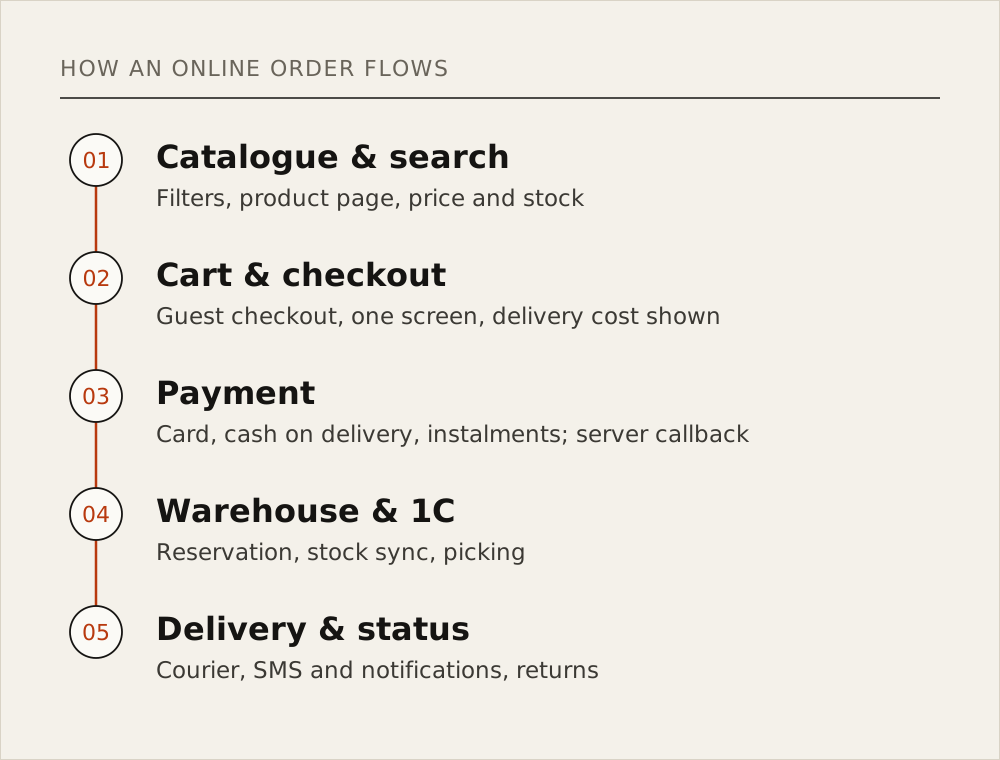
Catalogue, search and filters
Shoppers search in their own words. Someone buying tyres searches by size rather than brand; someone buying perfume looks at notes and volume. Filters should follow the logic of your niche, since a generic "colour and price" filter is rarely enough. Search should cope with typos, synonyms and queries in different languages (in Azerbaijan, "təkər" and "шины" for tyres, for example).
Product page
Every product needs a clear name, real photos, specifications, a price, stock status, a delivery time and return terms. A description copied from the manufacturer's site is identical in hundreds of stores, and Google has no reason to show yours. At least for your best sellers, write your own copy.
Cart and checkout
Baymard Institute has aggregated 50 studies: on average, 70.22% of online shopping carts are abandoned without an order (Baymard Institute). In the institute's survey, excluding people who were "just browsing", the main reasons are:
| Reason | Share of shoppers |
|---|---|
| Extra costs too high (shipping, tax, fees) | 40% |
| Delivery was too slow | 20% |
| Didn't trust the site with card details | 19% |
| The site wanted me to create an account | 18% |
| Too long or complicated checkout | 17% |
| The website had errors or crashed | 17% |
Most of these come down to how the store is built. Show the delivery cost on the product page, not as a surprise in the cart. Allow guest checkout: a name, phone number and address are enough. Keep the checkout on one mobile-friendly screen, and test the payment step with a real card on a real phone.
Payments
Shoppers in Azerbaijan usually expect three options: online card payment, cash or card on delivery, and instalments with taksit (instalment) cards. For online payments you connect either a bank's internet acquiring service or a payment provider that aggregates several banks. When choosing, ask:
- What's the fee per transaction, and how many days until the money reaches your account?
- How are refunds made: from the admin panel or through a request to the bank?
- Are instalments and repeat payments with a saved card supported?
- How does the payment result reach your site?
The last question sounds technical, but it matters most. The payment provider must send the result straight to your server (a callback). You can't rely only on the shopper's browser returning to the "payment successful" page: they may close the tab or lose connection, and a paid order stays "unpaid" in your system. Most payment-integration bugs show up not on successful payments but on failed, cancelled and duplicated ones. Each of these cases has to be tested before launch.
Delivery
For the shopper, delivery cost and time are part of the price. Rates and lead times differ between Baku, the Absheron peninsula and the regions, and shoppers need to see them before they order. If you run your own couriers, a simple mobile app for assigning and tracking orders saves a lot of time. I built one for Granite.az: couriers see orders in real time, orders are assigned automatically, and the app is connected to the CRM.
Admin panel and order statuses
Every stage of an order ("received", "paid", "out for delivery", "delivered") should be visible in the admin panel and reach the customer by SMS, e-mail or a messenger notification. Managers should be able to change products, prices, discounts and banners without calling a developer. Roles matter too: an operator handles orders but can't change pricing.
Warehouse, 1C and CRM integration
As a store grows, the main problem is no longer the site but stock: the site says "in stock", the warehouse has run out. The customer pays, you call to cancel, and you lose the customer.
The fix is automatic synchronisation with the warehouse software. In Azerbaijan, stock and accounting are often kept in 1C, so the typical setup is:
- 1C → site: products, prices and stock are pushed to the site at a set interval. 1C is the source of truth for stock.
- Site → 1C: a new order goes to 1C immediately and the items are reserved.
- Statuses: when the order is picked and shipped, the status flows back to the site and the customer.
Technically, this exchange belongs in background queues: when 1C responds slowly, the site must not slow down, and when something fails, the sync must retry rather than stop. On Granite.az I built the warehouse automation around exactly this 1C integration; the same platform runs a web CRM, payment gateways and automated invoicing. For Təkərevi.az I built the internal ERP/CRM and a loyalty programme from scratch. With a customer's whole order history in one place, repeat-purchase offers become much easier.
Do you need a mobile app?
For most stores, the first step isn't an app but a site that's fast on a phone. New shoppers find you on Google, on social media or through an ad, and want to order without installing anything. An app makes sense for returning customers: repeat orders, push notifications, loyalty points. Təkərevi.az also has an official Android app on Google Play. If you build an app, it should run on the same back end and API as the site, so prices and stock match everywhere. More in my article on mobile app development.
SEO for an online store
Google opens its guide for online stores with this:
"A critical challenge for any ecommerce website is being discovered in Search."
These are the issues I fix most often in stores:
- Category pages. For queries like "summer tyres" or "men's perfume", Google usually shows a category page, not a product. Every category needs a unique title, a short description and a readable URL.
- Filters. Every filter combination creates a new URL, and thousands of useless pages eat Google's crawl time. Google is explicit about it: "Oftentimes there's no good reason to allow crawling of filtered items, as it consumes server resources for no or negligible benefit" (Google, faceted navigation). Turn the few filters people actually search for into landing pages and block the rest from crawling.
- Product structured data. With schema.org
Productmarkup, price, availability and ratings can appear in the results: "users can see price, availability, review ratings, shipping information, and more right in search results" (Google, Product structured data). - Out-of-stock products. If the product is coming back, don't delete the page: mark it "out of stock" and show alternatives. If it's discontinued for good, 301-redirect it to a similar product or the category.
- Speed. On a large catalogue, speed is decided by images (WebP at the right size), caching and database queries, and speed affects both rankings and sales.
On Təkərevi.az, technical SEO, schema markup, speed optimisation and conversion tracking have been my responsibility since 2014. Oktay Ahmadov, CEO of Level Up LLC, wrote in his signed letter of 5 January 2026:
"Under his technical and strategic leadership, our website has consistently ranked within the top three search results for highly competitive industry keywords for many years."
For the basics, see what is SEO.
The legal and organisational side
I'm not a lawyer, so treat this section as a checklist and confirm each point with an accountant or lawyer:
- Business registration and tax regime (sole trader or LLC, a VÖEN tax number in Azerbaijan).
- An internet acquiring agreement with the bank and cash-register (fiscal) requirements.
- Terms of sale, a privacy policy, and delivery and returns rules on the site.
- Storing and protecting customers' personal data (name, phone, address).
In Azerbaijan, this area is mainly governed by the laws "On Electronic Commerce", "On Consumer Rights Protection" and "On Personal Data".
What drives cost and timeline
I don't answer "how much does ecommerce website development cost?" with a number: very different amounts of work are sold under the same name. These factors set the price and the timeline:
| Factor | Effect on cost and timeline |
|---|---|
| Catalogue | Number of products, variants (size, colour), filter logic |
| Design | Ready template, adapted template or custom design |
| Payments | How many banks or providers, instalments, refunds, saved cards |
| Delivery | Zones, rates, a courier app, integration with delivery services |
| Integrations | 1C, warehouse, CRM, SMS, marketplaces |
| Languages | Each language means separate copy, SEO and testing |
| Content | Who prepares product photos and descriptions |
| Migration from an old site | Keeping products, customers, URLs and Google rankings |
| Mobile app | A separate project, but on the same back end |
When you budget, count the monthly costs too, not just the build: domain, server, payment fees, SMS, technical support, product photography and ads.
Real examples
- Təkərevi.az (Level Up LLC). Azerbaijan's first online tyre shop. I built the site and the internal ERP/CRM from scratch and have been the technical partner since 2014: catalogue and inventory, a loyalty programme, analytics, schema markup, speed. The store has led its market for more than ten years and has held top-three Google positions for competitive queries for years. It also has an Android app on Google Play.
- Granite.az (Granite AZ MMC). An ecommerce platform built from scratch, a web CRM, warehouse integration with 1C, payment gateways and automated invoicing, a mobile app for couriers, and Arduino-based GPS tracking. I have supported it for more than seven years.
- Jouwanni.az (2024). An online perfume store on Laravel. SEO brought it to 250–300 visitors a day within two months.
Natig Guliyev, CEO of Granite AZ MMC, wrote in his signed letter of 23 December 2024:
"Additionally, he developed our E-commerce platform and executed a robust SEO strategy that has kept us as the market leader in our sector for years."
The full list is on the projects page, and the scans of the signed letters are on the home page.
Checklist before you start
- Your product list, specifications and photos are ready.
- You know where stock is kept (1C, a spreadsheet, warehouse software) and how it will reach the site.
- Payment methods are chosen and agreed with a bank or payment provider.
- Delivery zones, rates and lead times are written down.
- Returns rules and terms of sale are ready.
- The domain and server are in your name; you hold the code and the admin access.
- Google Search Console and Analytics are in your account.
- It's clear who takes an order, who picks it and who delivers it: the process works even on paper.
- You have a traffic plan for the first months: SEO, ads, social media.
- Support terms after launch are in the contract.
FAQ
What do I need to open an online store?
A product catalogue, a domain and server, a way to accept payments (a bank or payment provider), a delivery process, a registered business and terms of sale on the site. On the technical side: a mobile-friendly site, an admin panel, order notifications and baseline SEO.
How much does ecommerce website development cost?
It depends on the size of the catalogue, the payment and delivery logic, integrations such as 1C, and the design. A small store on a ready-made platform is cheap to start, but the monthly plan and plugins are ongoing costs. A custom store costs more upfront, but your processes are fully automated and the code is yours.
I sell on Instagram. Do I need a website?
If sales are growing, yes. Instagram will keep bringing new buyers, but the catalogue, stock, online payments, shoppers from Google and your customer base belong on a site. The best results come from using both.
Can I build an online store myself?
Yes. Starting on a ready-made platform with a small catalogue is a good way to test an idea. You'll need a developer once you need local payments, 1C, your own delivery logic and serious SEO.
When will the store start selling?
With ads, the first orders can arrive on launch day. Organic traffic from Google takes months for a new domain and competitive queries, so plan SEO at the design stage, not after launch.
Bottom line
Ecommerce website development is more than ordering a website: sales channels, platform, payments, delivery, warehouse and visibility on Google have to work as one system. You can start small, but choose a platform you won't have to rebuild when you grow. If you'd like technical advice or an estimate for your store, see my services and get in touch.