BlogWebsites · Laravel · SEO
Website development: process, types of sites, cost and timeline
Also available in: Azərbaycanca Русский
Website development is a service where almost every page you find is a sales pitch: "affordable", "fast", "free domain included". I have been building websites and web platforms since 2014, starting with 28 sites in two years at an advertising agency, then online stores, portals and government systems. This guide explains the work the way an engineer sees it: the types of websites, the process, the technology, what drives cost and timeline, and what to demand in the contract.
What website development includes: the short answer
Website development is the process of turning a business goal into a working website: gathering requirements, planning the structure and design, programming, testing, deploying to a server and setting up the SEO basics so Google can find it. The deliverable is not just a set of pretty pages but also an admin panel, a domain and hosting, security, analytics and support after launch.
In plain terms, a website is a set of linked pages served under its own address (for example, company.az). Anyone can open it in a browser, and the owner updates the content through an admin panel. Launch day is the start of its life, not the end: I have worked on Təkərevi.az since 2014, and it is still being developed.
Types of websites: landing page, business site, online store, web application
The first question is not "how much does a website cost?" but "which kind of website do I need?". The type decides the technology, the timeline and the budget.
| Type | Who it's for | Typical features | Relative complexity |
|---|---|---|---|
| Landing page | A single product, campaign or event | One page, lead form, analytics | Low |
| Business (corporate) site | Companies, clinics, law firms, service businesses | Services, portfolio, news, contact, 2–3 languages | Low–medium |
| Online store | Businesses selling products | Catalogue, filters, cart, online payment, order management, 1C or warehouse integration | Medium–high |
| Web application or portal | Platforms, customer accounts, internal systems | User accounts, roles, reports, API, real-time features | High |
Landing page
One page with one job: collect leads, sign people up for an event, present a product. Great for an ad campaign, limited for SEO, because one page can't answer dozens of different searches.
Business site
Your company's office on the internet: who you are, what you do and how to reach you. Every service deserves its own page, because Google answers each search with a specific page. In Azerbaijan these sites are usually bilingual or trilingual.
Online store
E-commerce is one of my core areas. A store is much more than "a site with a cart": catalogue, stock, pricing rules, payments, delivery, order statuses and often a 1C integration. Its revenue depends directly on how well the catalogue is indexed by Google.
Web application or portal
Systems where users log in and get work done: customer accounts, ERP/CRM, learning platforms, listings portals. Most of the work happens behind the pages: database design, permissions, integrations, speed under load. Website builders don't fit here.
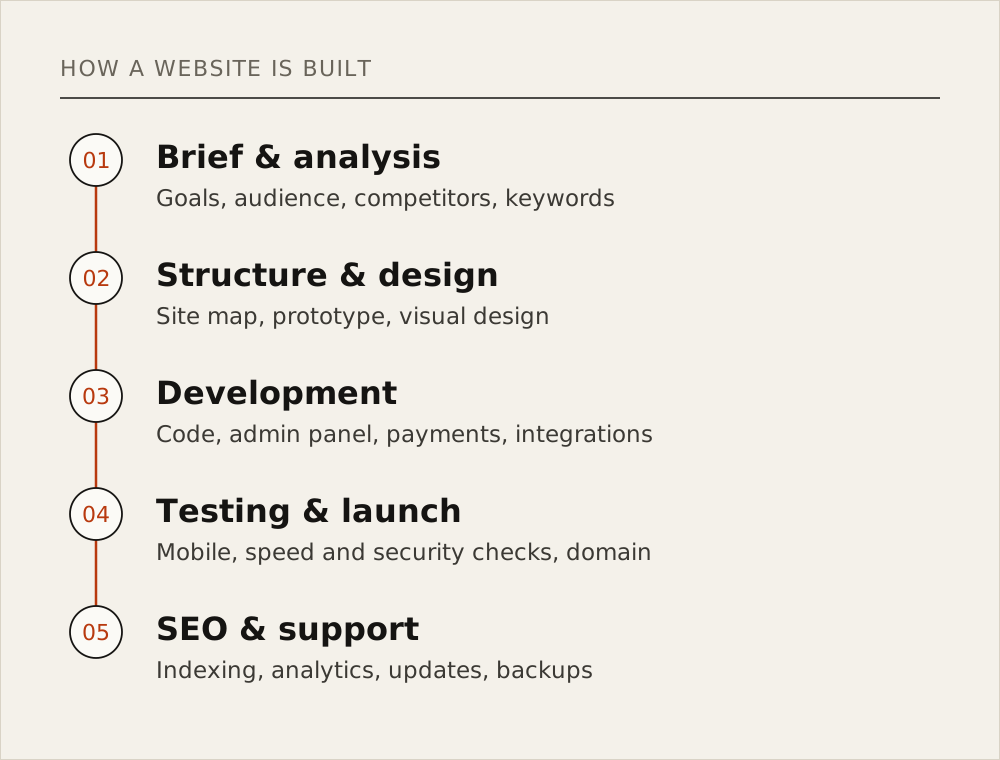
The website development process in 5 stages
I follow the same sequence on every project, and each stage ends with something concrete in your hands. No deliverable, no stage.
1. Brief and analysis
We define a measurable goal (leads, online sales or an automated internal process), the users, the languages, the competitors and what customers type into Google.
Deliverable: a written specification (pages, features, integrations, languages), a keyword map and a written quote.
2. Structure and design
Sitemap and wireframes first, then the visual design, starting from the phone screen, because roughly half of visitors arrive on a smartphone. The URL structure is fixed here too: changing it after launch costs rankings.
Deliverable: sitemap, mobile and desktop mockups of the key pages (for example in Figma), an approved URL structure.
3. Development
Front-end, back-end (server side and database) and the admin panel. The code lives in Git and progress is shown on a staging server, so you test the site long before launch.
Deliverable: a working site on staging, the admin panel, integrations (payments, 1C, SMS, maps), a Git repository.
4. Testing and launch
Forms, cart, payments, phones, browsers, speed and security get tested. If an old site exists, 301 redirects from the old URLs keep the rankings it earned over the years. Then domain, SSL certificate, server and backups.
Deliverable: the live site on HTTPS, a redirect map, automatic backups, a signed acceptance document.
5. SEO and support
The site is added to Google Search Console, the sitemap.xml is submitted, and analytics with goals (lead, order) is configured. Afterwards bugs get fixed, features added, and the server and libraries kept up to date.
Deliverable: Search Console and Analytics under your own account, support terms in writing, the first monthly report.
Choosing the technology: website builder, WordPress or Laravel
Choosing a technology isn't a matter of taste. For a small business-card site Tilda can be perfectly enough, and a developer should say so upfront.
| Builder (Tilda, Wix) | WordPress | Custom development (Laravel) | |
|---|---|---|---|
| Time to start | Fastest | Fast | Longer |
| Design freedom | Within the template | Through themes and plugins | Full |
| Complex logic, integrations | Very limited | Depends on plugins | Anything |
| Control over speed and SEO | As far as the platform allows | Degrades as plugins pile up | Full |
| Security | The platform's responsibility | Depends on plugin updates | Depends on code quality |
| Ownership | The site lives on the platform; the code can't be moved | You own the code | You own the code |
| Best for | Landing pages, small business sites | Blogs, content sites, simple stores | Stores, portals, customer accounts, ERP/CRM |
My main tool is Laravel, a PHP framework. Payments, 1C, state e-document systems, permissions, queues and caching are handled in standard ways, and the code stays maintainable for years: the Granite.az platform has been in production for more than seven years. This site runs on Laravel too.
WordPress's main risk is plugins: each one makes the site heavier, and an outdated one becomes a security hole. With builders the risk is ownership: moving off the platform usually means starting from scratch.
What a good website needs in 2026
I treat this list as the minimum for any project. None of it is an "extra"; it is the website.
Mobile first
Google judges your site by its mobile version:
"Google uses the mobile version of a site's content, crawled with the smartphone agent, for indexing and ranking."
According to StatCounter, in August 2026 mobile devices accounted for 51.81% of web traffic in Azerbaijan, desktops for 47.83% and tablets for 0.35% (StatCounter Global Stats). Over the past year the mobile share swung between 37% and 67%, but the conclusion holds: menu, filters, cart and checkout must work as well on a phone as on a laptop.
Speed: Core Web Vitals
Google's speed and visual stability metrics (Core Web Vitals) have public thresholds on web.dev:
| Metric | What it measures | "Good" threshold |
|---|---|---|
| LCP (Largest Contentful Paint) | Loading of the main content | 2.5 seconds or less |
| INP (Interaction to Next Paint) | Response to clicks and taps | 200 milliseconds or less |
| CLS (Cumulative Layout Shift) | Layout jumping while the page loads | 0.1 or less |
"a good threshold to measure is the 75th percentile of page loads, segmented across mobile and desktop devices."
In other words, at least three out of four visits should meet these thresholds. And Google is open about the ranking impact:
"Core Web Vitals are used by our ranking systems."
HTTPS and security
HTTPS is the bare minimum, but security doesn't end with the padlock. I check code against the OWASP Top 10:
"The OWASP Top 10 is a standard awareness document for developers and web application security."
In the 2025 edition, Broken Access Control is number one: a customer changes the order number in the URL and sees someone else's order. Add strong passwords and two-factor login for the admin panel, SQL injection protection and timely library updates.
SEO basics
If Google can't find the site, most of the money spent on it is wasted. The minimum: unique titles and meta descriptions, readable URLs, an auto-updated sitemap.xml, a correct robots.txt, canonical tags and schema.org markup. More in What is SEO?.
Multiple languages and hreflang
Sites in Azerbaijan are usually built in Azerbaijani, Russian and English. Each language needs its own URL (/az/..., /ru/..., /en/...) and hreflang tags linking the versions. A switcher that swaps text with JavaScript on the same page counts as one language for Google.
Analytics, admin panel and backups
- Analytics: Google Analytics or an alternative, Search Console and tracking of calls, leads and orders.
- Admin panel: you change products, prices, text and images yourself, without calling a developer.
- Backups: automatic copies to another server, with a restore tested at least once.
How much does a website cost? What drives the price
I won't answer "how much does a website cost?" with a number: very different amounts of work are sold under the same "online store" label. Website development cost and timeline depend on these factors:
| Factor | How it affects cost and timeline |
|---|---|
| Type of site | A landing page and a portal with customer accounts differ many times over in scope |
| Design | Ready-made template, customised template or custom design |
| Number of pages and features | Every new form, filter or calculator is separate work |
| Integrations | Online payments, 1C, delivery, SMS, CRM, government systems |
| Number of languages | Each language means its own copy, SEO and testing |
| Content | Who writes the text, shoots the photos, fills in the product data |
| Migration from an old site | Preserving data, URLs and search rankings |
| Load | A hundred visitors a day and tens of thousands need different architectures |
| Support model | One-off handover or ongoing monthly maintenance |
Compare the scope, not the total: the cheaper quote usually leaves something out. Ask whether the design is custom, what the admin panel can change, whether SEO basics are included, and who fixes bugs in the first months.
Real results: websites and platforms I have built
Talking about website development services is easy, so here is my own work:
- Təkərevi.az (Level Up LLC). Azerbaijan's first online tyre shop. I built the site and its ERP/CRM from scratch and have been the technical partner since 2014. It has led its market for over ten years, holds top-three Google positions for its niche's most competitive keywords, and organic search alone brings in 25–30K AZN of sales a month.
- Granite.az (Granite AZ MMC). E-commerce platform, web CRM, 1C inventory integration, an expediter app with real-time order tracking and Arduino-based GPS tracking; in production for more than seven years.
- Jouwanni.az (2024). An online perfumery on Laravel; a two-month SEO campaign brought it 250–300 visitors a day.
- World Capoeira Federation. Membership, Stripe payments, brackets, live scoring and rankings in 100+ countries and 10+ languages; it ran the 2024 European Championship in Budapest.
- Yeniemlak.az. A real-estate portal, where I worked as a back-end developer, that grew to 25,000 visitors a day.
- Large systems. A unified ERP for 17 state institutions (I led 20 engineers), an e-university for 5,000+ students and a rebuilt credit-organisation core handling 22M+ transactions a day.
Natig Guliyev, CEO of Granite AZ MMC, wrote in his signed letter of 23 December 2024:
"He designed a custom Web CRM that successfully automated our internal processes and improved workflow efficiency."
The full list is on my projects page, and the signed letters are in the recommendations section on the home page.
Hiring a developer: what to put in the contract
Check this list before you hire anyone. Each point comes from problems I have seen on real projects.
- Domain and hosting in your name, so the site can't be held hostage if you part ways with the contractor.
- Source code and full access: the code in a Git repository, owner access to the server, database and admin panel.
- Rights to content and design: who owns the text, photos and design files, and whose name the paid font and photo licences are in.
- Acceptance criteria: what "done" means (pages, features, mobile version, speed thresholds, tested browsers).
- Milestones: payments tied to delivered stages, not "everything upfront".
- Warranty and support: how long bugs are fixed for free after launch, the terms of ongoing support and the response time.
- Analytics and Search Console in your account, with the contractor added only as an extra user.
Red flags
- A price is quoted immediately, with no brief and no questions.
- "Guaranteed first place on Google." Nobody can honestly promise that.
- Code or admin access is withheld because "it's our platform".
- The domain is registered in the contractor's name.
- The portfolio has no live, working sites, only screenshots.
- There is no staging server, and you first see the site on launch day.
FAQ
How long does website development take?
It depends on type and scope. A simple landing page takes days to a few weeks; an online store with integrations or a portal with customer accounts takes months. The slowest part is often the content (text, photos, product data) and approvals, not the code.
Can I build a website myself for free?
You can build a simple site on Tilda, Wix or WordPress, and for a small business that's a fair start. It won't be entirely free: you need a domain, a paid plan or hosting, and your time. Once you need online sales, integrations and serious SEO, the limits show quickly.
Template or custom build?
For a standard content site, a good template is enough. If your process is specific (a custom calculator, 1C integration, customer accounts, a complex catalogue), a custom build is cheaper in the long run, because you stop paying to bend a template to fit.
Who will manage the website after launch?
You or your staff manage content (products, prices, news) in the admin panel. The technical side (server, updates, backups, security) is the developer's job and belongs in a written support agreement.
Bottom line
Website development isn't ordering a design; it's building part of your business: the right type of site, a clear process, a domain and code in your name, a fast site that works on phones, SEO basics and support after launch. A good website earns for years; a bad one gets rebuilt a year later. For technical advice or a quote, see my services and get in touch.