BlogMobile apps · Flutter · Google Play
Mobile app development: from idea to Google Play and the App Store
Also available in: Azərbaycanca Русский
Mobile app development looks simple from the outside: hire a developer, get the code written, see the app in the store. In practice the code is only part of the job. Behind every app sit a server, an admin panel, Google Play and App Store rules, and updates that continue for years after launch. My Google Play developer account, "Malikoglu", has 36 live apps, including Verbooze, a MilliNet 2025 laureate. Here is the whole path from idea to store, from an engineer who does the work himself: whether you need an app, native or Flutter, the stages, the store rules, and what drives the cost.
What mobile app development involves: the short answer
Mobile app development is the process of planning, designing, building, testing and publishing software for Android and iOS phones through Google Play and the App Store. In almost every real project it also covers the back-end and API the app talks to, an admin panel for managing content, and support after release.
Do you need an app at all?
Sometimes the honest answer is "not yet": an app lives in two stores, needs regular updates, and people have to be persuaded to install it. If customers buy from you once a month, a good mobile website is usually enough. If they use your service daily or several times a week, an app pays for itself.
| Criterion | Mobile website | PWA (a website that behaves like an app) | Mobile app |
|---|---|---|---|
| How often it's used | Occasional visits from search | Regular, simple tasks | Daily or weekly |
| Found in Google | Yes, via SEO | Yes, via SEO | No, via store search (ASO) |
| Push notifications | No | Limited | Full |
| Camera, GPS, Bluetooth, offline | Limited | Partial | Full |
| Store presence | No | No | Google Play and App Store |
| Upfront cost | Low | Medium | High |
| Maintenance | Website updates | Website updates | Store rules, SDK updates, two platforms |
My usual advice: if your sales come from search, start with a fast, SEO-friendly website (see my article on website development) and add the app later for returning customers. The exceptions are games, offline tools, apps for couriers and field staff, and Bluetooth products like my AzMesh, which connects phones directly with no internet at all. No website can do that.
Native or Flutter: building for Android and iOS
In Azerbaijan, where I work, most phones run Android, but iOS still matters. StatCounter's August 2026 figures put the mobile OS split at 82.23% Android and 17.75% iOS (StatCounter Global Stats). Ship on Android only and you lose roughly one user in five.
There are two ways to cover both platforms:
- Native: Kotlin for Android, Swift for iOS. Two codebases, usually two developers or two teams.
- Cross-platform: one codebase for both. I use Flutter.
Flutter is made by Google, and its official site describes it like this:
"Flutter is an open-source framework for building beautiful, natively compiled, multi-platform applications from a single codebase."
| Native (Kotlin + Swift) | Flutter | |
|---|---|---|
| Codebase | Two | One |
| Team | Usually two specialists | One developer covers both platforms |
| A new feature | Written and tested twice | Written once, checked on both platforms |
| Newest platform APIs | From day one | Sometimes needs a plugin or native code |
| Games and 2D animation | Possible | A strength |
| Best fit | Deeply device-bound products, separate teams | Business apps, education, e-commerce, 2D games, MVPs |
All 36 of my live apps are built with Flutter, from Verbooze to the artillery game Tank Tussle and a simple currency converter. A feature is written once and ships to both stores, and a bug is fixed in one place; on small and mid-sized projects that shows up directly in the budget and in update speed.
I recommend native when the product depends on the deepest platform features (watches, in-car systems, specialised hardware) or when the company already runs separate Android and iOS teams.
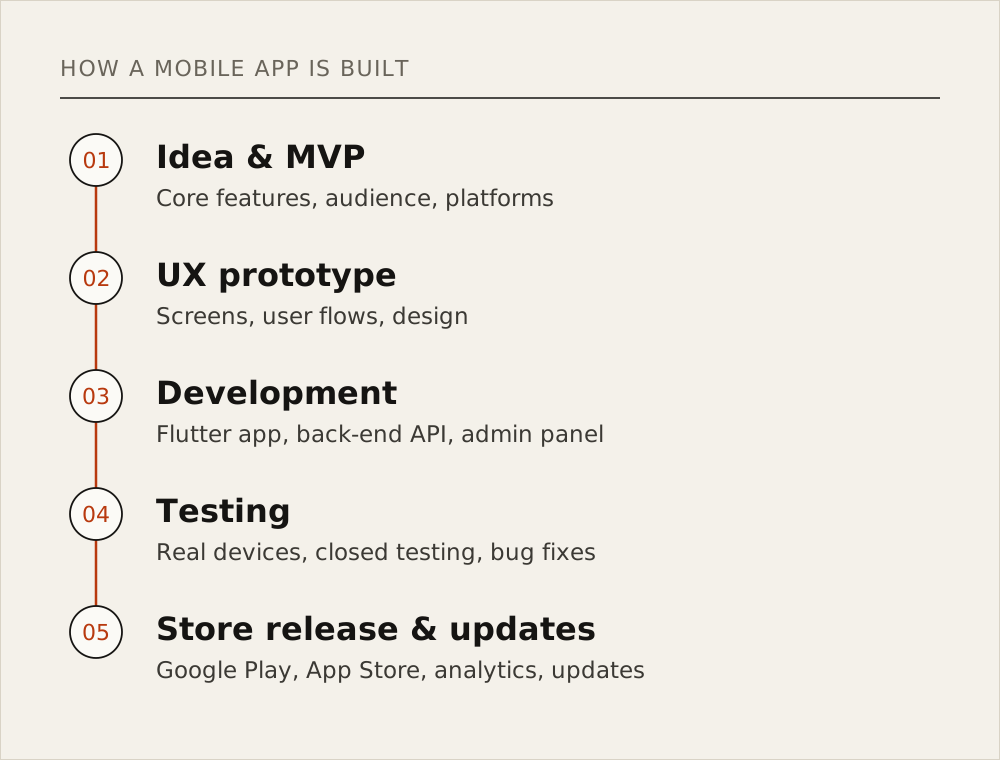
The mobile app development process in 5 stages
I split the work into five stages, and each one ends with something concrete in the client's hands, not a promise that "work is in progress".
1. Idea and scope (MVP)
It starts with one question: what job will the user get done with this app? The answer defines the MVP (minimum viable product). Most money is lost here, when "we'll need it later" features pile into version one.
Deliverable: a written list of screens, features, roles and data sources, with what is out of scope.
2. UX prototype
Before any code, screens and flows become a clickable prototype, usually in Figma. Changing a prototype costs a fraction of changing code.
Deliverable: key screen layouts, user flows, a colour and type system.
3. Development
The Flutter app and the server side are built in parallel, in iterations. After each one the client installs a test build on their own phone.
Deliverable: test builds, a working API, an admin panel, a Git repository.
4. Testing, including closed testing
The app is checked on different screen sizes, old and new Android versions, iPhones, and poor or no connection. Then comes closed testing: real people see the app in the store by invitation only, which is mandatory for new personal Google Play accounts (details below).
Deliverable: bugs found and fixed, tester feedback, a release-ready build.
5. Store release and updates
The store listing (name, description, screenshots, icon), privacy policy and data safety form are prepared, and the app goes to review. Release isn't the finish line: crash monitoring, updates and new store requirements start here.
Deliverable: a live app in both stores, full client access to the accounts, an update plan.
The part nobody quotes: back-end, API and admin panel
Apart from simple apps like a calculator or an offline game, almost every app needs a server to store and manage user accounts, products, orders, payments and notifications. The app reads it through an API, and you run the content from an admin panel.
I build the server side in Laravel; back-end work has been my core speciality for more than ten years. Verbooze pairs a Flutter app with a Laravel and Python back-end on Ubuntu: FFmpeg for video streaming, JitsiMeet for live lessons, WebSocket for language duels. When you get a quote, ask whether the server, API and admin panel are included.
Publishing on Google Play and the App Store
Store rules change often; I checked the facts below against official sources in September 2026.
Google Play: account, closed testing, requirements
Account. Google Play has two developer account types, Personal and Organization, and the fee is paid once: "There is a US$25 one-time registration fee" (Google Play Console Help).
Closed testing. The key rule for new personal accounts:
"Developers with personal accounts created after November 13, 2023, must run a closed test for their app with a minimum of 12 testers who have been opted in continuously for at least 14 days."
— Google Play Console Help, App testing requirements for new personal developer accounts
So your plan needs a test window of at least two weeks, with 12 real testers lined up in advance. If the app is for a company, open an Organization account in the company's name from the start.
Data safety form. You have to declare in Play Console what data the app collects and why:
"All developers that have an app published on Google Play must complete the Data safety form, including apps on closed, open, or production testing tracks."
Answers must match what the app and its SDKs (Firebase, analytics, ads) really collect.
Target API level. Google raises this bar every year. According to Android Developers, starting August 31, 2026:
"New apps and app updates must target Android 16 (API level 36) or higher to be submitted to Google Play"
Published apps have a threshold too: an app targeting lower than Android 15 (API level 35) stops being available to new users on devices running a newer Android version. So to ship even a small fix to an app nobody has touched for two years, you first have to upgrade Flutter, the SDK and the plugins.
App Store: membership, review, privacy
Publishing on the App Store requires the Apple Developer Program, listed on Apple Developer as a "$99 annual membership". Unlike Google's fee, it renews every year. Every app goes through App Review, and a privacy policy is mandatory:
"All apps must include a link to their privacy policy in the App Store Connect metadata field and within the app in an easily accessible manner."
Practical tips from 36 live apps
- Open the store accounts at the start of the project. Verification, payment and closed testing all take time.
- Host the privacy policy as a permanent page on your website. Both stores require it.
- Fill in the data safety form from the code, not from memory. Check what every library you've added collects.
- Give the reviewer a test account. If they can't log in, review drags on.
After launch: updates, analytics, reviews and ASO
- Crash monitoring. Firebase Crashlytics and similar tools show the phone, screen and cause of every crash. Without them you hear about bugs from bad reviews.
- Analytics. How many people sign up, reach the main action and come back a week later. Let these numbers set feature priorities.
- Ratings and reviews. Reply to every review and ask for a rating after a successful action, not on first launch.
- ASO (App Store Optimization). Title, descriptions, icon, screenshots and localisations, shaped around what people type into store search. The logic mirrors SEO, which I explain in What is SEO.
How much does it cost to build an app? What drives the price
I won't give numbers here: "mobile app" can mean a one-screen calculator or a platform with payments and an admin panel. These factors decide cost and timeline, and they decide Flutter app development cost too. Flutter saves by doing most of the work once for both platforms.
| Factor | Why it affects cost and timeline |
|---|---|
| Number of screens and features | Every screen means design, code and testing |
| Platforms | Android only, or Android and iOS; Flutter covers both from one codebase |
| Back-end and admin panel | Connecting to an existing server is one job; building a server, API and panel from scratch is another |
| Integrations | Payment providers, 1C, CRM, maps, SMS, social sign-in |
| Real-time features | Chat, live updates, video and online play need WebSocket and extra infrastructure |
| Offline mode | Storing data on the phone and syncing it with the server later |
| Design | Standard components, or custom design and animation |
| Languages | Each language means its own copy, screenshots and store listing |
| Store work | Accounts, closed testing, privacy policy, store listing |
| Support | Post-release updates, SDK requirements, server costs |
Real results: my own apps
I back this up with apps anyone can open in the store.
Verbooze. Azerbaijan's first gamified English-learning platform; I'm its founder and lead developer. 50,000+ users, 10,000+ daily active users, a 4.8★ rating from 151 reviews on Google Play and €50,000 of international investment. At the MilliNet 2025 national internet awards, Verbooze took second place in the "Digital Education Resource of the Year" nomination.
Games. Tank Tussle: Artillery War (100 missions across ten chapters plus online PvP duels, 500+ downloads), Domino, Chess, Checkers, Durak, Sudoku Classic, Block Blaze and Crazy Snake.
Tools. AzMesh (5.0★) is the offline Bluetooth and Wi-Fi messenger mentioned above. Currency Converter (5.0★) converts 150+ currencies at live rates and shows trend charts.
Business apps. The official app of the Təkərevi.az online tyre shop, a student cabinet for Honours Academy, and a CRM-integrated expediter app for Granite.az with real-time order tracking.
The full list is on the apps page, with case studies on the projects page.
Hiring a developer to build your app: a checklist
Before you sign a contract, settle these points:
- Store accounts are in your name. The developer is added to them as a user.
- You own the source code. It lives in your Git repository; the contract transfers the rights.
- Server and domain. Where the back-end runs, whose name it's in, the monthly cost, backups.
- Keys and service accounts. App signing keys, the Firebase project and payment provider accounts stay under your control.
- Support terms. Bug fixes after release, updates for store requirements, response times.
- Store listing access. You can edit the copy and reply to reviews yourself.
Red flags
- "We'll publish it on our account." Part ways and you can lose the app, its reviews and installs.
- Only a finished build, no source code. Nobody else will be able to continue the work.
- No mention of the server. Either it isn't included, or a separate bill arrives later.
- "Guaranteed store approval." Apple and Google run the review, and they make the call.
FAQ
How long does mobile app development take?
A simple app takes weeks; a platform with a back-end, payments and an admin panel takes months. Add store review and, on a new personal Google Play account, 14+ days of closed testing.
What is a mobile app?
A program installed on an Android or iOS phone from Google Play or the App Store that does one specific job, with full use of notifications, the camera, GPS, Bluetooth and offline mode.
Can I build an app myself?
A simple one, yes: with a no-code tool or by learning Flutter. For a business app with a server, payments and store requirements, an experienced developer saves both time and money.
Do I need separate apps for Android and iOS?
Each store has its own listing, but with Flutter one codebase produces both versions.
How do I publish an app on Google Play?
Register a Google Play Console account (US$25, one time), upload a signed AAB file, and complete the store listing, privacy policy and Data safety form. On a new personal account, first run a 14-day closed test with 12 testers, then apply for production access.
Bottom line
Mobile app development is more than code: idea and MVP, a prototype, a server and admin panel, testing, store rules and years of updates. Flutter shortens the path with one codebase for both platforms, but no technology replaces careful planning and store work. To take your app from idea to store, read about my Flutter app development service and get in touch.